
Workflow components
Use this when
Section titled “Use this when”Use workflow components to show progress, empty or unavailable states, notifications, navigation and responsive toolbars in a host-owned workflow.
Gallery capture
Section titled “Gallery capture”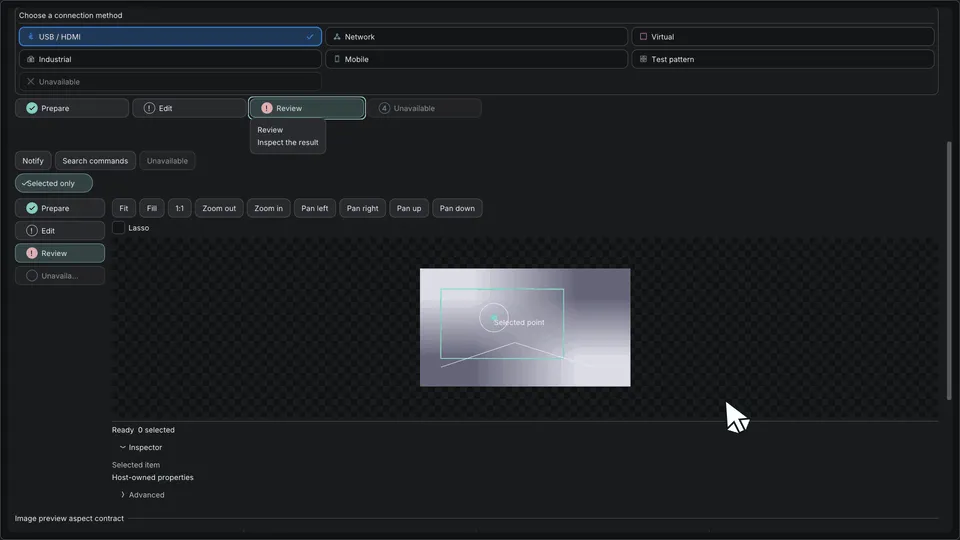
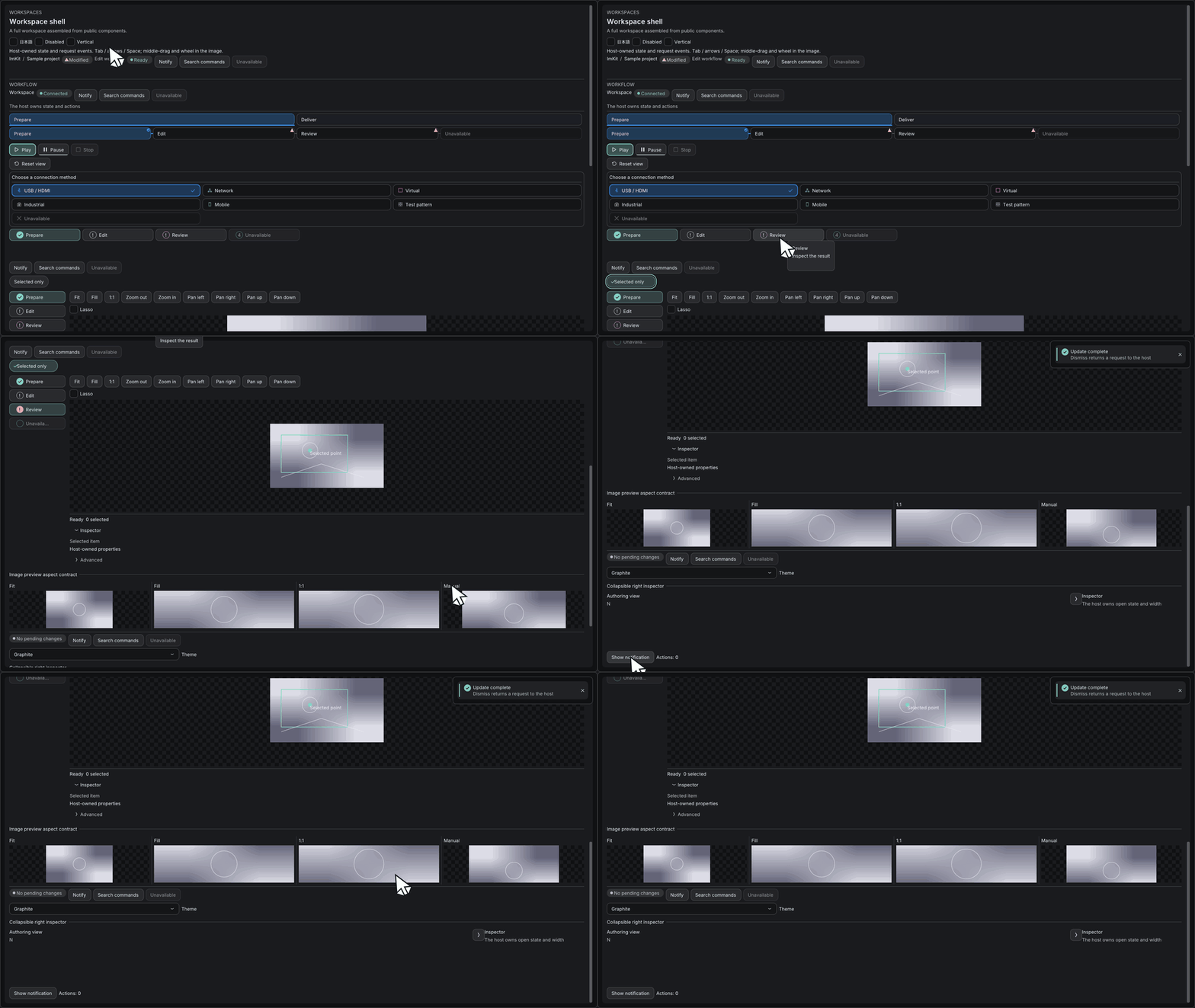
Workflow — progress and status feedback · Open the native Gallery animation
Minimum drawing example
Section titled “Minimum drawing example”#include <imkit/workflow.h>
void DrawImportProgress() { const imkit::CircularProgressView progress{ 0.42f, "42%", "素材を読み込み中" }; imkit::CircularProgress("asset-import", progress);}Example type: Complete function example using public header types. Call it during the application’s ImGui frame and keep the borrowed text valid for the draw call.
Integrate with the application
Section titled “Integrate with the application”Link imkit::imkit. Progress values and cancellation, notification queues, textures and persistence remain application state.
The library draws the requested state; it does not run workers, decide completion or persist notifications.
Related API and guides
Section titled “Related API and guides”Include imkit/workflow.h (also included by imkit/imkit.h) and link imkit::imkit. For images and previews, include imkit/editor_canvas.h and link imkit::editor_core. These additive APIs reuse patterns, Canvas, Selection and Splitter. They do not establish completion of the whole Editor Suite.
Ownership
Section titled “Ownership”Labels, textures, candidate views and scratch buffers are borrowed. IDs must be nonzero and unique per instance, except notifications: the last duplicate wins. State and queues belong to the host. ChoiceGroup borrows its items and optional IconAtlas; the returned ID is a request and never changes the host’s current value. No texture upload, worker, persistence, registry, undo engine or dependency is added. End every scope before destroying its context. Semantic text must remain valid through host frame publication.
Reset event buffers each frame. Full buffers set overflow. Keyboard tile resizing requires three slots for Begin/Update/Commit. Mouse cancellation restores both adjacent sizes; terminal events are retried if the buffer is full. Tile sizes are host-owned, ID-keyed entries. Notification sorting uses caller index scratch and limits results to the smaller of scratch capacity and requested maximum.
API inventory
Section titled “API inventory”tests/workflow_api_compile.cpp is the workflow compile/link inventory, also built by source and relocated SDK consumers. docs/reference/api-inventory.json continues to list Dear ImGui aliases; workflow compositions are inventoried here.
| API | Contract |
|---|---|
StepNavigator, NavigationRail |
Borrowed StepItem span, current ID, explicit focus state; returns a selection request |
WorkspaceTabs |
Icon and label navigation; collapses to a combo when space is narrow; returns a selection request |
ChoiceGroup |
Bordered heading and responsive one-to-three-column radio choices; returns the selected stable ID as a request; host owns current state |
HierarchyGroupHeader, HierarchyRow |
Host-owned group state and stable row IDs; full-width selection, ellipsized labels and optional accentColor; selection, visibility, lock and optional group action are requests; unavailable visibility or lock actions may be omitted |
BeginInspectorCard, EndInspectorCard |
Groups related controls in an auto-height bordered card; always pair Begin/End |
BeginCollapsibleInspectorCard, EndCollapsibleInspectorCard |
Inspector card with a host-owned open state; call End only when Begin returns true. Closed content is not drawn |
SettingToggleRow |
Label, description and optional disabled reason; returns a toggle request without changing host state |
FilterChip, SectionHeader |
Explicit selection/open state, native activation |
SelectNotifications |
Last duplicate wins before expiry filtering; priority descending, stable ties |
NotificationCard(FeedbackView), InlineAlert, PersistentBanner |
Semantic status and dismiss request; banner persists |
ToastRegion(id, ...) |
Host queue/time/scratch, work-area-clamped stack, no focus stealing |
EmptyState(id, StateView), UnavailableState, RetryState |
Heading, description, optional icon/action; returns a request |
Progress(ProgressView, ...) |
Inline, child overlay, modal; negative fraction means indeterminate; cancel request |
ProgressTrack(ProgressTrackView) |
Shared thin rounded bar with label, status, percentage or host value, and supplemental text; negative or nonfinite fraction is indeterminate |
StageProgress(StageProgressView) |
Display-only ordered stage statuses; narrow layouts show the current stage and n/total |
TaskProgressCard(TaskProgressCardView) |
Regular or compact task summary; returns a stable operation ID for the host to handle |
CircularProgress(CircularProgressView, ...) |
Borrowed fraction/value/label; negative or non-finite fraction means unavailable; no threshold or state ownership |
BeginCard, EndCard |
Always paired, even when Begin returns false |
MultiSelectionBar, HelpCallout, ValidationSummary |
Host count, commands or issues; no validation engine |
ResponsiveToolbar(..., ToolbarOptions) |
Overflow, icon labels, disabled reasons, native keyboard focus |
ResolveRightSidePanelLayout, RightSidePanelHandle |
Host-owned open/width state, compact edge toggle and mouse/keyboard resize; host scopes shortcut requests |
ImageGeometryValid, FitImage, ClampImage |
Numeric image layout independent of texture availability |
ResolveImagePlacement |
Pure Fit/Fill/Stretch destination and UV crop resolver; invalid geometry is rejected |
PixelToNormalized, NormalizedToPixel |
Divide/multiply by image dimensions; invalid dimensions return zero |
BeginImageViewport, EndImageViewport |
Existing Canvas, borrowed texture, uniform zoom; always paired |
ZoomToolbar |
Fit/fill/1:1, zoom and pan; updates display state |
DrawOverlay |
Point/polyline/rectangle/circle/label, selected/hovered decoration, clipped |
PreviewTile, ResizableTileStrip |
Borrowed previews/actions, horizontal/vertical scroll, minimum extents |
RequestBuffer::Push, TileEventBuffer::Push |
Caller storage, explicit overflow |
ChoiceGroup uses input-height buttons and eight-pixel card padding. It reduces the column count when the longest complete label, optional icon and selection mark need more room. ## label suffixes remain available to ImGui and UI tests but are omitted from the visible text, tooltip and semantic name. Descriptions and disabled reasons appear on hover or focus.
Image coordinates start at top left, x right and y down; Canvas units are image pixels. Use the existing ToScreen/FromScreen for desktop-screen conversion. Fit shows the whole image, Fill crops, and 1:1 maps one image pixel to one ImGui coordinate unit (not necessarily one physical display pixel). Clamp centers small images and limits large images to their edges. Cursor-anchored zoom is preserved until edge clamping is needed. Resizing refits non-manual modes. CanvasSelection handles marquee and lasso selection.
ResolveImagePlacement uses local coordinates whose origin is the available region’s top-left. Fit returns a centered destination with full UVs, Fill returns the full destination with centered crop UVs, and Stretch uses both complete regions. It owns no texture or renderer and returns valid=false for non-positive, non-finite or non-drawable geometry.
Pass ComponentOptions for theme, locale and semantic publication. Draw-only overlays do not create interactive object nodes; the host describes edited objects. Step arrows skip disabled items; native Tab/Shift-Tab and activation remain intact. Splitter additionally supports arrow-key resizing. Reduced motion uses existing static indicators; no new transitions are introduced.
ResolveRightSidePanelLayout returns widths for content, the always-visible edge handle and the optional panel. Draw those regions in that order and pass the same available extent to RightSidePanelHandle. The host decides whether an N key or another shortcut becomes toggleRequested; this prevents the library from stealing text input or shortcuts from unrelated editors. The handle remains visible while collapsed, and the panel reduces content width instead of covering it.
Progress views
Section titled “Progress views”ProgressTrackView is the shared source for the stage label, status text, determinate percentage (unless valueText supplies a host value), rounded bar and supplemental text. Progress and TaskProgressCard reuse it; cards and toasts do not assemble a second percentage or status line. ProgressStatus supports Queued, Running, Paused, Succeeded, Failed and Cancelled. Negative or non-finite fractions are indeterminate. Only an indeterminate Running track moves a short segment; Theme.motion.enabled, reducedMotion and the host AnimationState control motion.
StageProgress only displays the supplied stages and current ID. When the available width is too small, it shows the current stage and n/total. TaskProgressCardView borrows its strings and operation span for the frame; TaskProgressCard returns the clicked Command.id (zero means no request), and the host updates any values. Set TaskProgressCardOptions::compact to omit the description and tighten actions.
imkit::ProgressTrackView progress;progress.fraction = fraction; // Negative or non-finite means indeterminate.progress.status = imkit::ProgressStatus::Running;progress.label = "Inspecting files";progress.supplemental = "The host owns progress updates.";imkit::ProgressTrack("import-progress", progress, {&theme, &animation});Gallery
Section titled “Gallery”For colored cards with six positions, actions and progress, see Toasts. Existing ToastRegion behavior remains unchanged.
Open Workspace shell (page 15), Progress and states, or Preview tiles. Generic Workspace includes the new connection-method ChoiceGroup example. It combines navigation, toolbar, image, overlays, selection, feedback and status, and uses the existing procedural texture. --verify-workflow --output <directory> runs public IO checks and captures 36 page/theme combinations plus two narrow Japanese/disabled examples. Native GPU captures are distinct from native OS/IME and screen-reader tests.
ImKit 3.2 workspace
Section titled “ImKit 3.2 workspace”Open Workspace in the Gallery to use WorkspaceTabs, HierarchyGroupHeader/HierarchyRow, BeginInspectorCard/EndInspectorCard, SettingToggleRow, DragVector3WithUnit, ChoiceGroup and CompactActionRow together. Requests update Gallery-owned values; the same pattern works in an existing ImGui frame. See the 3.2 declarations and lifetime rules. All 321 runtime icons and 13 themes are available without introducing a new context or application framework.